Logitech MX Master 4 Mouse (Graphite)
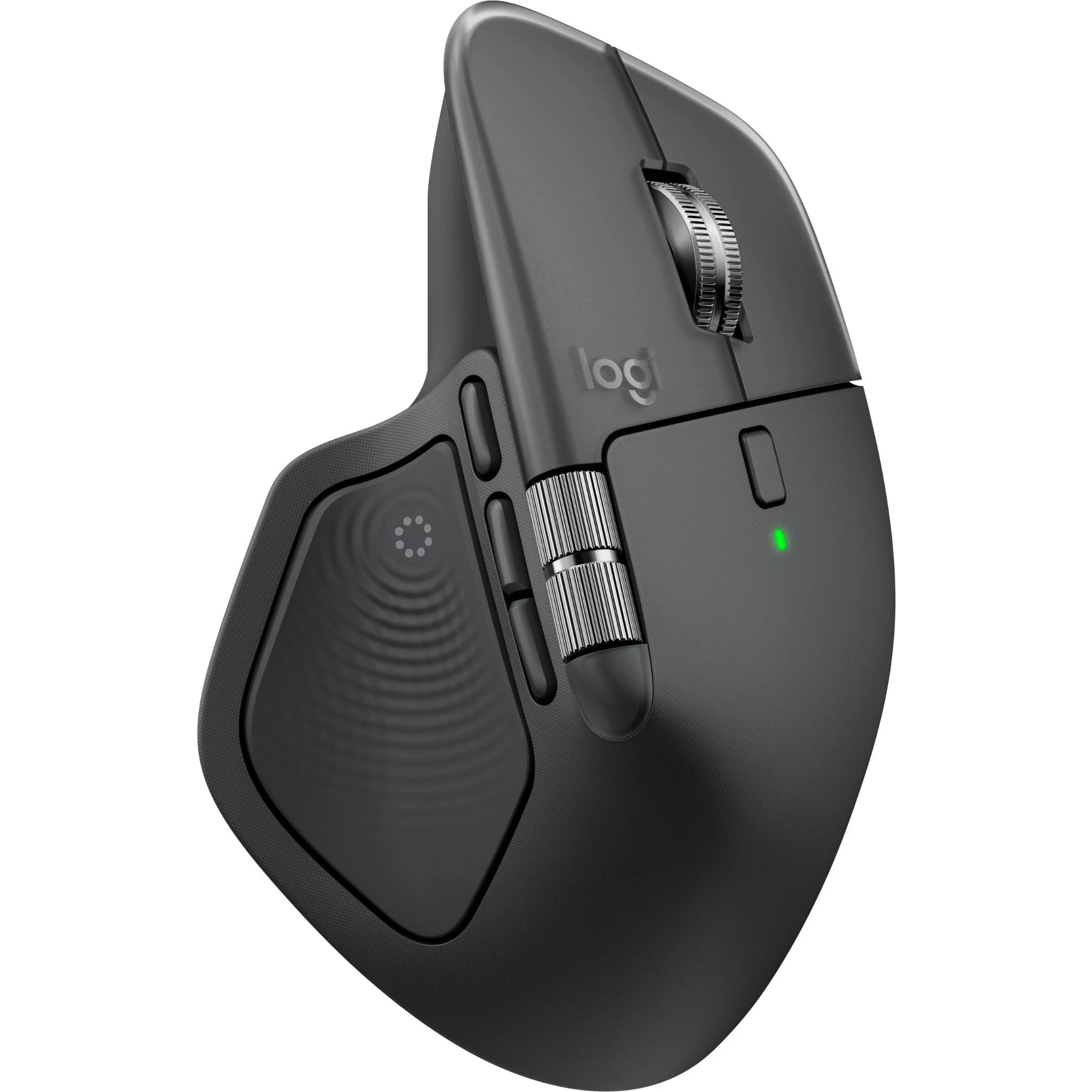
MX Master 4 brings immersive control and precision you can feel with haptic feedback. Experience haptic feedback on specific actions, shortcuts, notifications like switching desktops, slider adjustments and more. Customize vibration intensity in Logi Options+ (1). With Actions Ring, save up to 33% of your time (2) by accessing tools and filters at your cursor.
Key Features
Precision you can feel with the Haptic Sense Panel; customisable (1) haptic feedback on specific actions, shortcuts, notifications enhancing productivity on this wireless Bluetooth mouse
Effortlessly access favourite tools with Actions Ring (2) on this MX Series mouse—a dynamic, customisable overlay adapts to each app, placing most used filters, adjustments, and shortcuts at your cursor
Enjoy 2x more powerful connectivity (7) with a USB-C dongle, advanced radio chip, and optimised antenna for faster, stronger, reliable performance — or use Bluetooth for more versatility
Quiet Clicks on MX Master 4 reduce noise and distractions, offering a soft, satisfying feel with 90% less click noise (8) — perfect for focused workflows
What’s in the box
MX Master 4 wireless mouse
Logi Bolt USB-C receiver
User documentation
Sustainability
Plastic parts include recycled plastic - 54% Graphite;
Plastics: 54% for graphite, black and 48% for pale grey post-consumer recycled plastic. Excludes plastic in the receiver, printed wiring assembly, cable, and packaging. Thumbwheel: Low-carbon aluminium Paper packaging: FSC™-certified
(1) Requires Logi Options+ app, available for Windows and macOS at app.logi.com
(2) Logitech Ergo Lab study (2025) with 37 MX Master mouse users tested across 8 desktop actions. Results may vary depending on assigned shortcuts.
(3) Compared to Logitech Master 2S mouse with Logitech Options installed and Smooth scrolling enabled
(4) Compared to regular Logitech mouse without an electromagnetic scroll wheel
(5) 4 mm minimum glass thickness.
(6) Compared to a regular Logitech mouse with default DPI setting.
(7) Compared to MX Master 3S
(8) Compared to MX Master 3, MX Master 4 has 90% less Sound Power Level left and right click.
(9) Device basic functions will be supported without software for other systems than Windows and macOS
(10) Battery life may vary based on user and computing conditions
(11) Charging cable not included
(12) Excludes plastic in printed wiring assembly (PWA), receiver, wire, FFC cable, and packaging.
(13) ADOBE - only for countries that have partnership! Please ask your POC.
MX Master 4 brings immersive control and precision you can feel with haptic feedback. Experience haptic feedback on specific actions, shortcuts, notifications like switching desktops, slider adjustments and more. Customize vibration intensity in Logi Options+ (1). With Actions Ring, save up to 33% of your time (2) by accessing tools and filters at your cursor.
Key Features
Precision you can feel with the Haptic Sense Panel; customisable (1) haptic feedback on specific actions, shortcuts, notifications enhancing productivity on this wireless Bluetooth mouse
Effortlessly access favourite tools with Actions Ring (2) on this MX Series mouse—a dynamic, customisable overlay adapts to each app, placing most used filters, adjustments, and shortcuts at your cursor
Enjoy 2x more powerful connectivity (7) with a USB-C dongle, advanced radio chip, and optimised antenna for faster, stronger, reliable performance — or use Bluetooth for more versatility
Quiet Clicks on MX Master 4 reduce noise and distractions, offering a soft, satisfying feel with 90% less click noise (8) — perfect for focused workflows
What’s in the box
MX Master 4 wireless mouse
Logi Bolt USB-C receiver
User documentation
Sustainability
Plastic parts include recycled plastic - 54% Graphite;
Plastics: 54% for graphite, black and 48% for pale grey post-consumer recycled plastic. Excludes plastic in the receiver, printed wiring assembly, cable, and packaging. Thumbwheel: Low-carbon aluminium Paper packaging: FSC™-certified
(1) Requires Logi Options+ app, available for Windows and macOS at app.logi.com
(2) Logitech Ergo Lab study (2025) with 37 MX Master mouse users tested across 8 desktop actions. Results may vary depending on assigned shortcuts.
(3) Compared to Logitech Master 2S mouse with Logitech Options installed and Smooth scrolling enabled
(4) Compared to regular Logitech mouse without an electromagnetic scroll wheel
(5) 4 mm minimum glass thickness.
(6) Compared to a regular Logitech mouse with default DPI setting.
(7) Compared to MX Master 3S
(8) Compared to MX Master 3, MX Master 4 has 90% less Sound Power Level left and right click.
(9) Device basic functions will be supported without software for other systems than Windows and macOS
(10) Battery life may vary based on user and computing conditions
(11) Charging cable not included
(12) Excludes plastic in printed wiring assembly (PWA), receiver, wire, FFC cable, and packaging.
(13) ADOBE - only for countries that have partnership! Please ask your POC.
Description
MX Master 4 brings immersive control and precision you can feel with haptic feedback. Experience haptic feedback on specific actions, shortcuts, notifications like switching desktops, slider adjustments and more. Customize vibration intensity in Logi Options+ (1). With Actions Ring, save up to 33% of your time (2) by accessing tools and filters at your cursor.
Key Features
Precision you can feel with the Haptic Sense Panel; customisable (1) haptic feedback on specific actions, shortcuts, notifications enhancing productivity on this wireless Bluetooth mouse
Effortlessly access favourite tools with Actions Ring (2) on this MX Series mouse—a dynamic, customisable overlay adapts to each app, placing most used filters, adjustments, and shortcuts at your cursor
Enjoy 2x more powerful connectivity (7) with a USB-C dongle, advanced radio chip, and optimised antenna for faster, stronger, reliable performance — or use Bluetooth for more versatility
Quiet Clicks on MX Master 4 reduce noise and distractions, offering a soft, satisfying feel with 90% less click noise (8) — perfect for focused workflows
What’s in the box
MX Master 4 wireless mouse
Logi Bolt USB-C receiver
User documentation
Sustainability
Plastic parts include recycled plastic - 54% Graphite;
Plastics: 54% for graphite, black and 48% for pale grey post-consumer recycled plastic. Excludes plastic in the receiver, printed wiring assembly, cable, and packaging. Thumbwheel: Low-carbon aluminium Paper packaging: FSC™-certified
(1) Requires Logi Options+ app, available for Windows and macOS at app.logi.com
(2) Logitech Ergo Lab study (2025) with 37 MX Master mouse users tested across 8 desktop actions. Results may vary depending on assigned shortcuts.
(3) Compared to Logitech Master 2S mouse with Logitech Options installed and Smooth scrolling enabled
(4) Compared to regular Logitech mouse without an electromagnetic scroll wheel
(5) 4 mm minimum glass thickness.
(6) Compared to a regular Logitech mouse with default DPI setting.
(7) Compared to MX Master 3S
(8) Compared to MX Master 3, MX Master 4 has 90% less Sound Power Level left and right click.
(9) Device basic functions will be supported without software for other systems than Windows and macOS
(10) Battery life may vary based on user and computing conditions
(11) Charging cable not included
(12) Excludes plastic in printed wiring assembly (PWA), receiver, wire, FFC cable, and packaging.
(13) ADOBE - only for countries that have partnership! Please ask your POC.